
Digital payments have revolutionized the way Indians conduct financial transactions. Among the various payment platforms available, PhonePe stands out as one of the most popular and user-friendly options. If you’re using PhonePe for your daily transactions, you might have wondered about your UPI ID and how to find it. This comprehensive guide will walk you through everything you need to know about locating and using your UPI ID in PhonePe.
What Is a Browser Fingerprint? A Complete Guide to Digital Identity Tracking
What is a UPI ID and Why Does It Matter?
Before diving into how to find your UPI ID in PhonePe, it’s essential to understand what a UPI ID actually is. UPI stands for Unified Payments Interface, a revolutionary payment system that allows users to transfer money instantly using just a mobile number and internet connection. Your UPI ID is a unique identifier that combines your username with your bank’s UPI service provider, making it easier for others to send you money without requiring your complete bank account details.
A typical UPI ID looks like this: yourname@phonepe or yourname@okhdfcbank. This 12-character identifier serves as your digital address in the UPI ecosystem. Having quick access to your UPI ID is crucial for receiving payments from friends, family, and business associates.
Step-by-Step Guide: How to Find Your UPI ID in PhonePe
Method 1: Finding UPI ID Through Your Profile
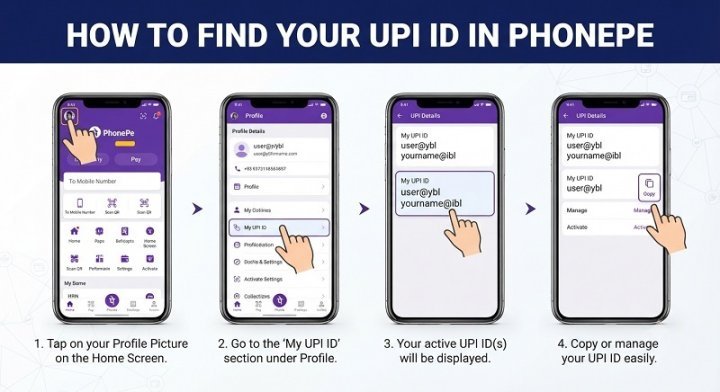
The most straightforward way to find your UPI ID in PhonePe is through your profile section. Follow these simple steps:
- Open the PhonePe App: Launch the PhonePe application on your smartphone.
- Tap on Your Profile Icon: Look for your profile picture or icon, typically located in the bottom right corner of the home screen.
- Navigate to Account Settings: Once you access your profile, look for an “Account” or “Profile Settings” option.
- Find Your UPI ID: Under your personal information section, you’ll see your UPI ID displayed prominently. It usually appears near your phone number and name.
- Copy Your UPI ID: You can tap on your UPI ID to copy it to your clipboard for easy sharing with others.
Method 2: Finding UPI ID in Payment History
Another effective way to locate your UPI ID in PhonePe is by checking your transaction history:
- Go to Your Transaction History: Navigate to the “History” or “Transactions” section in the app.
- Open Any Recent Transaction: Click on any transaction you’ve received or sent.
- View Transaction Details: Your UPI ID will be visible in the transaction details, usually displayed as the receiving or sending address.
Method 3: Checking Your UPI ID During Payment
When you’re in the process of making or receiving a payment on PhonePe, your UPI ID appears on the screen:
- Initiate a Payment: Start the process of sending money to someone.
- Enter Recipient Details: When entering the recipient’s information, your UPI ID will be shown as your payment identifier.
- Note Down Your UPI ID: You can reference or copy your UPI ID from this screen.
Understanding Your PhonePe UPI ID Format
PhonePe allows users to create custom UPI IDs that are both memorable and professional. Your UPI ID typically follows this format:
- Custom Handle: The part before the @ symbol (e.g., “john.sharma”)
- Service Provider: The part after the @ symbol (usually “phonepe” or your linked bank name)
When you first set up PhonePe, the app automatically generates a UPI ID for you. However, you have the option to customize the handle to make it more personalized and easier to remember.
Why Would You Need Your UPI ID?
Understanding when and why you need your UPI ID is just as important as knowing where to find it:
Receiving Payments
Your UPI ID is essential when you want friends, family members, or business associates to send you money. Instead of sharing your full bank account number and IFSC code, you simply provide your UPI ID.
Business Transactions
If you run a small business or freelance, sharing your UPI ID is the quickest way for clients to send payments. It’s professional, secure, and efficient.
QR Code Generation
PhonePe can generate a QR code linked to your UPI ID, allowing people to scan and send you money instantly without manually typing your ID.
Payment Verification
Your UPI ID serves as proof of your payment identity, making it useful for various verification processes and payment confirmations.
Tips for Managing Your UPI ID Safely
While your UPI ID is designed to be shared, here are some best practices for keeping your account secure:
Keep It Confidential
Never share your UPI ID along with your phone’s OTP or PIN. While the UPI ID itself is safe to share, coupling it with authentication details compromises your security.
Monitor Incoming Payments
Regularly check your PhonePe transaction history to ensure all incoming payments are legitimate and expected.
Use Strong Authentication
Ensure your PhonePe account is protected with a strong PIN and enable two-factor authentication wherever available.
Verify Before Sharing
Only share your UPI ID with trusted individuals. Avoid posting it on public platforms or unknown websites.
Update Your Profile Regularly
Keep your registered phone number and bank details updated in PhonePe to prevent any complications with payment receipt.
Common Issues and Solutions
Can’t Find Your UPI ID?
If you’re unable to locate your UPI ID in PhonePe, try logging out and logging back in. Sometimes a simple refresh resolves display issues.
Want to Change Your UPI ID?
PhonePe allows you to create multiple UPI IDs or customize your existing one. Navigate to your account settings and look for the option to “Manage UPI IDs” or “Customize Your Handle.”
Forgotten Your UPI ID?
Contact PhonePe customer support or check your linked bank’s website. Your bank maintains records of all registered UPI IDs.
Frequently Asked Questions About PhonePe UPI ID
Q: Can I have multiple UPI IDs in PhonePe? A: Yes, PhonePe allows you to create multiple UPI IDs using the same phone number, though you’ll need a separate bank account for each.
Q: Is sharing my UPI ID safe? A: Sharing your UPI ID is completely safe. It’s designed to be publicly shared. However, never share your PIN or OTP along with it.
Q: Can I change my UPI ID? A: You can create a new custom UPI ID through your account settings, though your original ID remains linked to your account.
Conclusion
Finding your UPI ID in PhonePe is a simple process that takes just a few taps on your smartphone. Whether you access it through your profile settings, transaction history, or during a payment, knowing where to locate your UPI ID ensures smooth digital transactions. This unique identifier is your gateway to the modern digital payment ecosystem, making it easier than ever to send and receive money. By following the steps outlined in this guide and adhering to the safety tips provided, you can confidently manage your PhonePe account and enjoy hassle-free digital payments. Keep your UPI ID handy, share it wisely, and experience the convenience that digital payments bring to your financial life.
