
JPG vs PNG: What’s the Difference and Which Should You Use?
If you’ve ever uploaded an image online, designed a logo, or built a website, you’ve probably run into the choice between JPG and PNG. The two formats look similar at a glance — both display photos and graphics — but under the hood they work in very different ways. Picking the wrong one can mean blurry photos, bloated file sizes, or a logo with an ugly white box around it.
This guide breaks down exactly what JPG and PNG are, how they differ, and which one you should reach for depending on the job at hand.
What Is a JPG File?
JPG (or JPEG, short for Joint Photographic Experts Group) is one of the oldest and most widely used image formats on the internet. It was designed specifically for photographs and images with complex colors, gradients, and lighting.
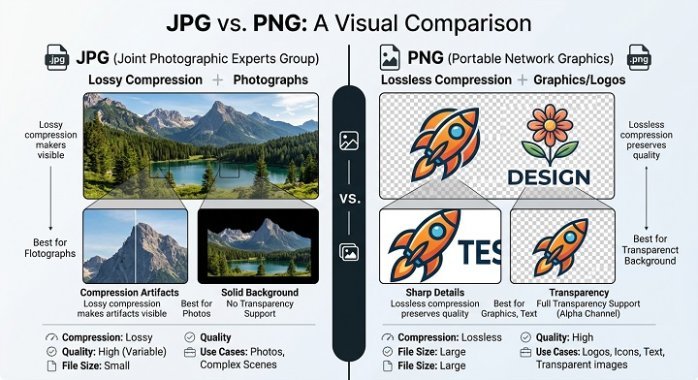
JPG achieves its small file sizes through lossy compression. That means every time an image is saved as a JPG, the format throws away some data that the human eye is less likely to notice — subtle color shifts, fine detail in busy areas, and so on. The more you compress a JPG, the smaller the file gets, but the more quality you lose. Save and re-save a JPG too many times, and you’ll start to see blocky artifacts, especially around sharp edges or text.
JPG does not support transparency. Every JPG image has a solid rectangular background, even if that background is invisible in your editing software — it will show up as white (or whatever color you set) once exported.
What Is a PNG File?
PNG (Portable Network Graphics) was developed in the mid-1990s partly as a free, open alternative to the older GIF format. Unlike JPG, PNG uses lossless compression. That means no image data is discarded when you save a file — what goes in is exactly what comes out, pixel for pixel.
This makes PNG the go-to format for anything that needs crisp edges and precise detail: logos, screenshots, illustrations, icons, and graphics with text. Because there’s no quality degradation, you can open, edit, and re-save a PNG as many times as you want without any visible loss.
PNG’s other standout feature is alpha transparency. A PNG file can have a fully or partially transparent background, which is why it’s the standard format for logos and web graphics that need to sit cleanly on top of different colored backgrounds.
The tradeoff is file size. Because PNG doesn’t throw away data, PNG files are typically much larger than JPGs of the same image, especially for photographs with lots of color variation.
Key Differences Between JPG and PNG
| Feature | JPG | PNG |
|---|---|---|
| Compression | Lossy (loses quality) | Lossless (no quality loss) |
| File size | Smaller | Larger |
| Transparency | Not supported | Fully supported |
| Best for | Photos, complex images | Logos, graphics, text, screenshots |
| Editing durability | Degrades with repeated saves | No degradation |
| Color support | Millions of colors | Millions of colors + alpha channel |
When to Use JPG
JPG is the right choice when:
- You’re uploading photographs — vacation photos, product shots, portraits, anything with natural lighting and color gradients.
- File size matters more than pixel-perfect quality, such as for email attachments, mobile apps, or websites where page load speed is a priority.
- You don’t need a transparent background.
- You’re working with images that have a lot of color variation, since JPG compression is optimized for this kind of content.
Most digital cameras and smartphones default to JPG for exactly this reason: photos compress well under the lossy algorithm without an obvious drop in visual quality, and the smaller files are easier to store and share.
When to Use PNG
PNG is the better option when:
- You need a transparent background — logos, product images on e-commerce sites, app icons, and stickers.
- You’re saving screenshots, since PNG preserves sharp text and clean lines far better than JPG.
- Your image has flat colors, text, or hard edges, like infographics, charts, or digital illustrations. JPG compression tends to create fuzzy artifacts around text and sharp lines, while PNG keeps them crisp.
- You plan to edit the file repeatedly. Because PNG is lossless, you won’t lose quality each time you save.
Web designers and developers lean on PNG heavily for UI elements, icons, and logos because these graphics need to stay sharp at every size and layer cleanly over any background color.
A Quick Real-World Example
Imagine you’re building a website. Your homepage banner is a photo of a mountain landscape — that’s a JPG. Your company logo, which needs to sit on top of that banner with a transparent background, is a PNG. Your “Download Our App” button icon, which has sharp edges and flat colors, is also a PNG. This is exactly how most professional websites split their image assets, and it’s why understanding the difference matters even if you’re not a designer.
Does It Affect SEO or Website Speed?
Yes, actually. Image file size directly affects page load speed, which is a ranking factor for search engines and a major factor in user experience. Using the wrong format — say, a PNG for a full-size photograph — can bloat your page weight unnecessarily and slow things down. As a rule of thumb:
- Use JPG for large photographic images to keep file sizes manageable.
- Use PNG only where transparency or sharp detail is genuinely needed.
- Consider newer formats like WebP or AVIF if your platform supports them, since they often combine the best of both worlds: smaller file sizes with support for transparency.
Frequently Asked Questions
Is PNG better quality than JPG? PNG preserves more detail because it’s lossless, but that doesn’t automatically make it “better” — it depends on the use case. A JPG photo saved at high quality can look just as good to the eye while taking up a fraction of the space.
Can I convert a JPG to a PNG? Yes, but converting a JPG to PNG won’t restore detail that was already lost during JPG compression. You’ll just get a larger file with the same (already-compressed) quality.
Which format loads faster on websites? JPG generally loads faster for photographic content due to smaller file sizes. PNG can load just as fast for small graphics like icons and logos, but becomes noticeably heavier for large, complex images.
Final Thoughts
JPG and PNG aren’t competitors so much as tools built for different jobs. JPG shines with photographs and anywhere small file size matters most. PNG shines with graphics, logos, and anything that needs transparency or pixel-perfect sharpness. Once you know the difference, choosing between them becomes second nature — and your images, your website speed, and your storage space will all be better for it.
