
What Is a Kafka Topic? A Complete Beginner’s Guide
If you’ve spent any time exploring modern data engineering or event-driven architecture, you’ve almost certainly come across Apache Kafka. And at the heart of nearly every conversation about Kafka is one foundational concept: the Kafka topic. Understanding topics is the first real step toward understanding how Kafka works as a whole.
In this guide, we’ll break down what a Kafka topic actually is, how it’s structured internally, how data flows through it, and why this simple-sounding concept powers some of the largest real-time systems in the world.
A Quick Recap: What Is Apache Kafka?
Before diving into topics, it helps to remember what Kafka itself does. Apache Kafka is a distributed event streaming platform used to publish, store, and process streams of records in real time. Companies use it to move data between systems — think order events, clickstreams, log data, sensor readings, or financial transactions — reliably and at massive scale.
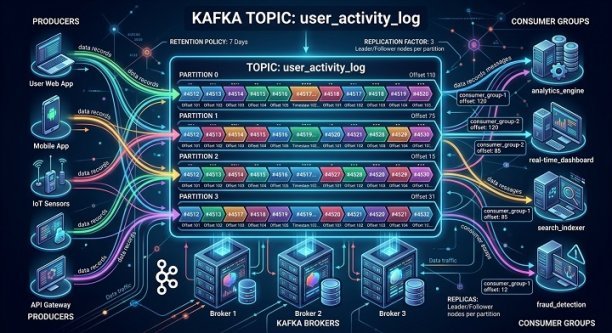
Kafka achieves this through a publish-subscribe model, where producers write data and consumers read it. But producers and consumers don’t talk to each other directly. Instead, they interact through an intermediary structure: the topic.
So, What Exactly Is a Kafka Topic?
A Kafka topic is a named channel or category to which records (messages) are published. Think of it as a logical feed or table where a specific type of data lives. For example, an e-commerce platform might have topics named order-created, payment-processed, and inventory-updated.
Producers write messages to a topic, and one or more consumers subscribe to that topic to read those messages. Topics decouple the systems that generate data from the systems that consume it — a producer doesn’t need to know who’s reading the data, and a consumer doesn’t need to know who wrote it. This separation is what makes Kafka so flexible for building scalable, loosely coupled architectures.
Unlike a traditional message queue, where a message disappears once it’s consumed, a Kafka topic retains messages for a configurable period of time (or indefinitely, if configured that way). This means multiple consumers — or the same consumer at different times — can read the same data independently.
Topics Are Split Into Partitions
Here’s where Kafka’s real power comes in. A topic isn’t a single, monolithic log — it’s divided into partitions. Each partition is an ordered, immutable sequence of records that gets continually appended to, much like a log file.
Partitioning matters for two big reasons:
- Scalability — Because a topic can have multiple partitions, Kafka can distribute those partitions across multiple brokers (servers) in a cluster. This allows for parallel reads and writes, letting Kafka handle enormous throughput.
- Ordering guarantees — Kafka guarantees message order within a partition, but not across an entire topic. If strict ordering matters for a particular key (like all events for a single customer), Kafka uses that key to consistently route related messages to the same partition.
Each message within a partition is assigned a unique, sequential ID called an offset. Offsets let consumers track exactly where they are in the stream, so they can pause, resume, or replay data as needed.
How Data Flows Through a Kafka Topic
To understand a topic in action, it helps to walk through the lifecycle of a message:
- A producer sends a record to a topic, optionally including a key that determines which partition it lands in.
- Kafka appends the record to the end of that partition’s log, assigning it the next available offset.
- The record is retained in the topic based on the configured retention policy — commonly a time limit (e.g., seven days) or a size limit.
- One or more consumer groups subscribe to the topic and read records starting from a specific offset, either the beginning, the latest point, or a specific position they’ve previously tracked.
- Consumers process the data — maybe storing it in a database, triggering a downstream service, or feeding a real-time dashboard.
Because Kafka retains data rather than deleting it immediately after consumption, the same topic can serve multiple independent consumers, each moving through the log at their own pace.
Key Configuration Options for Kafka Topics
When creating a topic, several settings shape how it behaves:
- Number of partitions — Determines the maximum parallelism for consumers and how data is distributed across brokers.
- Replication factor — Controls how many copies of each partition exist across the cluster, which is critical for fault tolerance.
- Retention period — Defines how long messages stay available before being deleted or compacted.
- Cleanup policy — Either
delete(removes old records after the retention window) orcompact(keeps only the latest record for each unique key, useful for maintaining current-state data).
Choosing the right configuration depends heavily on your use case. A topic storing high-volume clickstream data might use a short retention window, while a topic representing account balances might use log compaction to always retain the latest state per user.
Kafka Topics vs. Traditional Message Queues
It’s worth clarifying how Kafka topics differ from queues in systems like RabbitMQ or traditional JMS-based brokers. In a classic queue, a message is typically consumed once and then removed. Kafka topics behave more like a durable, replayable log:
- Multiple consumer groups can read the same topic independently, each maintaining their own offset.
- Data persists for a configurable duration regardless of whether it’s been read.
- Consumers can rewind and reprocess historical data, which is invaluable for debugging, auditing, or backfilling analytics.
This log-based design is a major reason Kafka has become the backbone of event-driven architectures, real-time analytics pipelines, and microservices communication.
Real-World Use Cases for Kafka Topics
Kafka topics show up across a wide range of industries and applications:
- E-commerce — Tracking orders, inventory changes, and shipment updates as separate topics.
- Finance — Streaming transaction events for fraud detection or real-time balance updates.
- IoT — Ingesting sensor data from thousands of connected devices into dedicated topics.
- Log aggregation — Centralizing application and infrastructure logs for monitoring and alerting.
- Microservices communication — Allowing services to publish domain events without direct coupling to other services.
Final Thoughts
A Kafka topic might sound like a simple concept on the surface — just a named stream of messages — but it’s the foundation that everything else in Kafka is built on. Partitions enable scalability, offsets enable precise tracking, retention policies enable flexibility, and the publish-subscribe model enables clean separation between producers and consumers.
Whether you’re designing a real-time analytics pipeline, building a microservices architecture, or just getting started with event streaming, understanding how Kafka topics work is essential. Once you grasp this core building block, the rest of Kafka’s architecture — brokers, consumer groups, replication, and stream processing — starts to make a lot more sense.
