
Two-Factor vs Two-Step: What’s the Real Difference?
If you’ve ever logged into an account and been asked for a code sent to your phone, you’ve used some form of extra login security. But here’s a question that trips up even tech-savvy users: is that “two-factor authentication” or “two-step verification”? The terms get used interchangeably all the time, and while they’re closely related, they aren’t quite the same thing. Understanding the distinction can help you make smarter choices about how you protect your accounts.
The Short Answer
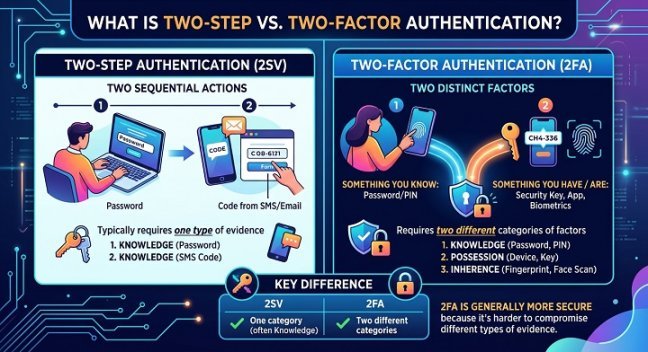
Two-factor authentication (2FA) is a type of two-step verification, but not all two-step verification qualifies as true two-factor authentication. The difference comes down to what kind of proof you’re providing, not just how many times you provide it.
Two-step verification simply means you complete two steps to log in — regardless of what those steps involve. Two-factor authentication is more specific: it requires two different categories of proof, called “factors.” That distinction matters more than most people realize.
Breaking Down “Factors”
Security experts generally recognize three categories of authentication factors:
- Something you know — a password, PIN, or security question answer
- Something you have — a phone, hardware security key, or authenticator app
- Something you are — a fingerprint, face scan, or other biometric marker
True two-factor authentication combines two of these different categories. For example, entering a password (something you know) and then approving a push notification on your phone (something you have) counts as genuine 2FA, because you’re proving your identity in two fundamentally different ways.
Where Two-Step Verification Differs
Two-step verification, on the other hand, doesn’t require the two steps to come from different categories. A common example: you enter your password, and then you’re asked to enter a second password-like PIN, or answer a security question. Both of those steps fall into the “something you know” category. It’s still two steps — but it’s not truly two factors, because an attacker who has stolen your knowledge-based credentials (through phishing, for instance) could potentially satisfy both steps.
Another example is email-based verification. You enter your password, then receive a code via email that you type in to complete login. If your email account itself is only protected by a password, someone who compromises that email could complete both steps of your two-step process. It’s still an extra layer of security compared to a password alone, but it doesn’t have the same resilience as authentication that spans different factor categories.
Real-World Examples
To make this concrete, here’s how common security methods stack up:
- Password + SMS code: Technically two-factor, since it combines something you know with something you have (your phone). However, SMS is considered a weaker “have” factor because of risks like SIM-swapping attacks.
- Password + authenticator app (like Google Authenticator or Authy): Strong two-factor authentication, combining knowledge and possession.
- Password + hardware security key (like a YubiKey): Considered one of the most robust forms of 2FA available today.
- Password + fingerprint scan: Two-factor authentication combining knowledge and biometrics.
- Password + secret question: Two-step, but not two-factor, since both rely on knowledge.
- Password + backup password sent to a secondary account: Also two-step rather than true two-factor, for the same reason.
Why This Distinction Actually Matters
You might be thinking: does it really matter what we call it, as long as there’s an extra step? The answer is yes, and here’s why.
Security is fundamentally about resilience against different types of attacks. If both of your verification steps rely on the same category of proof, a single method of compromise — like a phishing attack that captures your password and security answers at once — can potentially defeat your entire login process. True multi-factor setups force an attacker to succeed at two very different kinds of attacks simultaneously: they’d need to steal your password and physically access your phone, or steal your password and replicate your fingerprint. That’s a much higher bar to clear.
This is why financial institutions, healthcare providers, and enterprise IT departments increasingly specify “multi-factor authentication” (MFA) — the broader term that encompasses 2FA — in their compliance and security requirements, rather than simply requiring “two-step” login processes.
Which One Should You Use?
For most personal and business accounts, aim for genuine two-factor authentication whenever it’s offered. Here’s a quick hierarchy from strongest to weakest, all else being equal:
- Hardware security keys (strongest)
- Authenticator apps with time-based codes
- Push notifications through a dedicated app
- SMS text codes (better than nothing, but vulnerable to interception)
- Email-based codes or knowledge-based questions (weakest, especially if your email lacks its own strong protection)
If a service only offers two-step verification using two knowledge-based methods, it’s still worth enabling — it’s better than a password alone. But where you have the choice, opt for a setup that spans two distinct factor categories.
Common Misconceptions
“Two-factor and two-step mean the same thing.” Not quite. All two-factor authentication is two-step, but not all two-step verification is two-factor.
“More steps always mean more security.” Not necessarily. Three steps that all rely on knowledge-based proof (passwords, PINs, security questions) can still be defeated by a single phishing attack that captures all of them at once.
“SMS codes are just as secure as authenticator apps.” SMS is convenient, but it’s vulnerable to SIM-swapping and interception, making authenticator apps or hardware keys a more secure choice when available.
The Bottom Line
The terms “two-factor” and “two-step” get used loosely in everyday conversation, and most people won’t notice or care about the technical difference. But if you’re serious about protecting sensitive accounts — banking, email, work systems, or anything tied to your identity — it’s worth checking exactly what kind of verification you’re using. Look for options that combine something you know with something you have or something you are. That combination is what actually makes an account harder to break into, not just the number of boxes you have to check before logging in.
Next time a service offers you extra login security, don’t just enable it and move on — take a moment to see which factors it actually uses. That small check could be the difference between a minor inconvenience and a major security upgrade.
